Jigsaw puzzle helper
Snap a piece. See its spot.
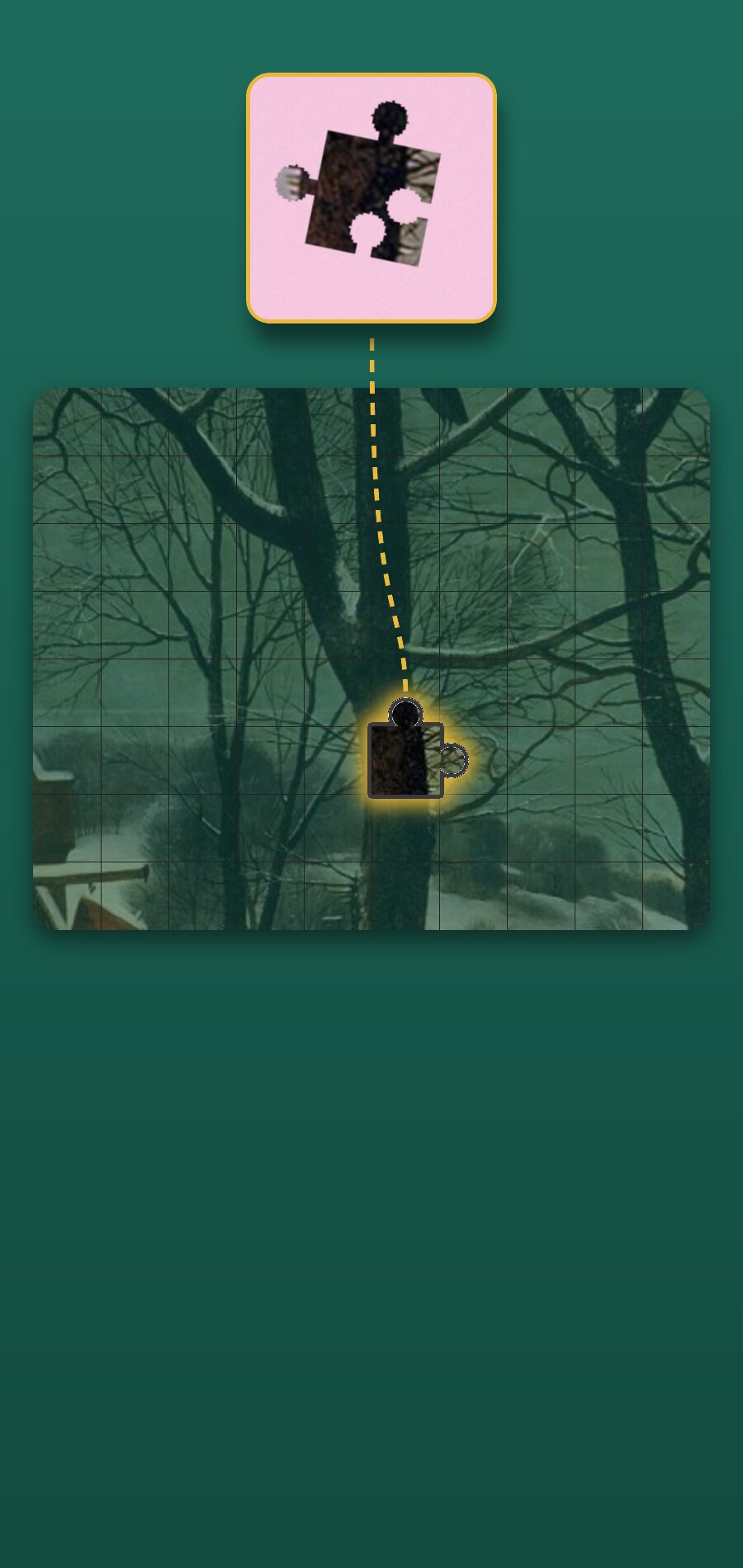
Lay one loose piece on the table and take a photo. PieceSnap lights up the cell where it most likely fits on your box picture — with two runner-up spots and which way to turn it.
- Candidate cells per piece
- Top 3
- Piece counts, or your own grid
- 300–2000
- Accounts needed
- 0
What is PieceNook?
PieceNook is a jigsaw puzzle helper that shows where a loose piece belongs on the box picture: you photograph your box once, then snap one piece at a time and PieceSnap lights up its most likely cell. It is a helper for real cardboard puzzles, not a jigsaw game, and the matching runs on your phone without an account.
How it works
Three steps to your first find
- 1
Photograph the box once
Drag the four corners onto the picture so PieceNook knows its edges.
- 2
Pick the piece count
300, 500, 1000, 1500 or 2000 pieces — or set your own rows × columns.
- 3
Snap one loose piece
Lay it in the square on the table. PieceSnap lights up where it goes.
Features
What PieceSnap shows you
Built for real cardboard puzzles on a real table.
The cell lights up
The box picture dims under a felt-green vignette and the likely cell glows in your piece's own knob-and-hole outline, with a 7×5 magnifier to compare up close.
Learn more →Top 3 spots, and which way to turn
Three candidate cells, each with a confidence level and a plain position like "row 12 from the top, cell 20 from the left" — plus how to rotate the piece before you try it.
Honest about plain pieces
Sky and water pieces could fit in many places. PieceNook marks a plain zone to search instead of pretending to know one cell.
Board map that fills in
Every find is kept. The picture fills in as you confirm cells, so you can see which parts are done.
Try it without a puzzle
Two public-domain sample puzzles with sample piece photos: Bruegel's "Hunters in the Snow" and Seurat's "A Sunday on La Grande Jatte".
On your phone
Matching runs on your device with OpenCV, even in airplane mode. No account, and your photos stay on your device.
Pricing
Free or lifetime
Free
$0
- 1 puzzle box of your own
- 15 finds a day
- Sample puzzles unlimited
Lifetime unlock
$4.99one payment
- Unlimited puzzle boxes
- Unlimited finds
- Board map
- No ads
- No subscription
FAQ
Is PieceNook a jigsaw game?
No. PieceNook helps you finish a real cardboard puzzle: it shows where a loose piece belongs on your box picture.
What happens with plain pieces like sky or water?
They could fit in many places, so PieceNook marks a plain zone to search instead of pretending to know one exact cell.
Can I try it without a puzzle?
Yes. Two public-domain sample puzzles with sample piece photos are built in, and they are unlimited on the free plan.
Does it need an internet connection or an account?
No. Matching runs on your phone with OpenCV, even in airplane mode, and no account is needed. Your photos stay on your device.
How much does it cost?
Free: 1 puzzle box of your own and 15 finds a day. The lifetime unlock is one payment, not a subscription: unlimited boxes, unlimited finds, the board map and no ads.
Which puzzles work best?
Detailed artwork works best. Pieces with little pattern get a zone instead of a single cell.
Get PieceNook
Coming soon to Google Play and the App Store.